 SECURIVERSE
FOR COMPANIES
Fill a shift.
Find a shift.
Choose your path to fill a shift or find work.
PRODUCT WALKTHROUGHS
See each side of Securiverse in action.
Choose the walkthrough designed for the way you use the platform.
FOR OPERATIVES
Operative App Walkthrough
BUILT FOR WHAT IS NEXT
Innovative by design.
Revolutionary for the industry.
Built for an industry that needs more than phone calls and spreadsheets, Securiverse brings location-based job discovery, digital job tools and shift activity into one clear experience.
Companies create a Job, select an applicant and monitor the shift from start through completion. Operatives find work in the areas they choose and manage shift activity in the app.
Location-based job searching
Operatives can look for available work in the areas they choose.
GPS-enabled shift activity
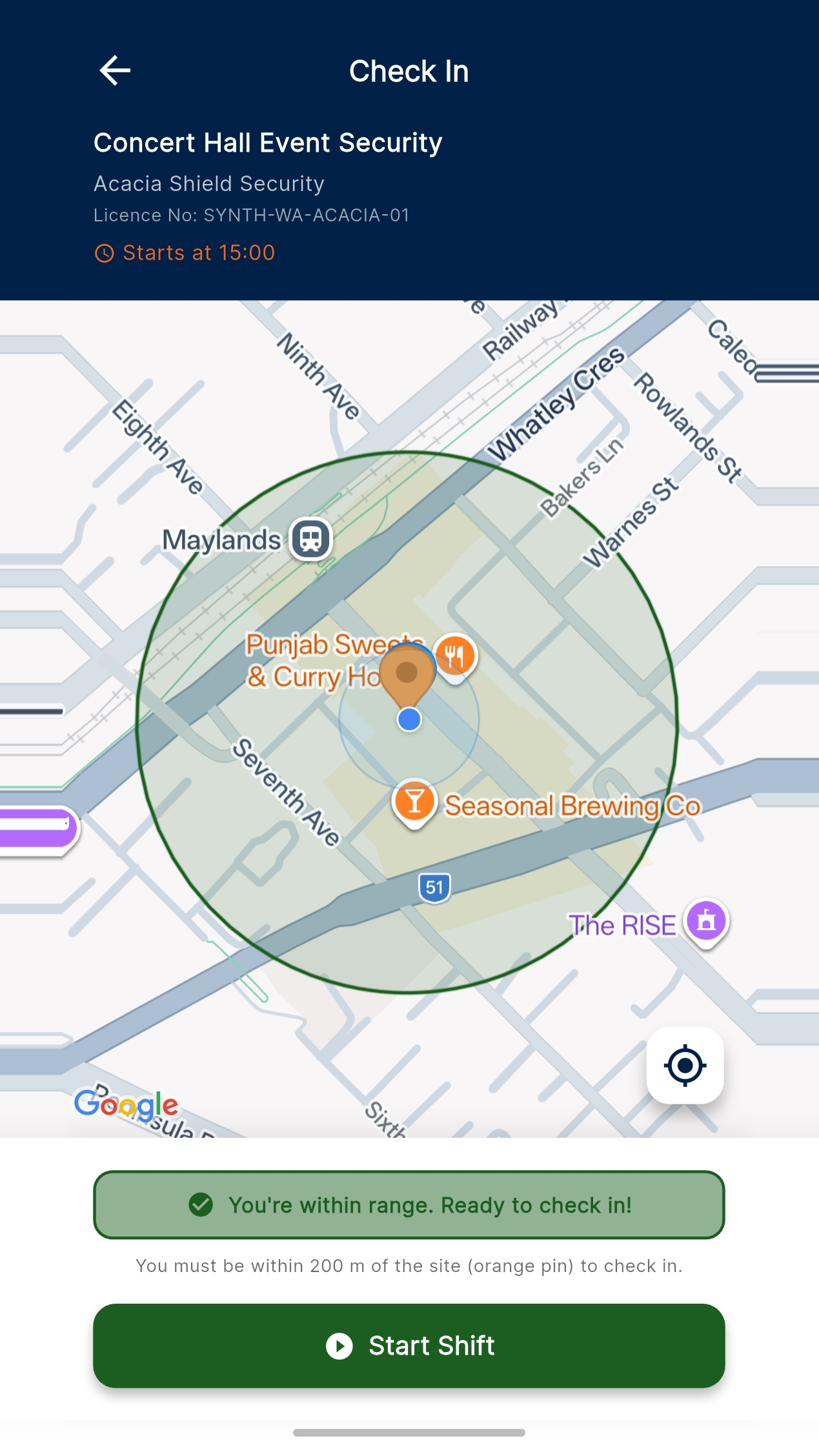
Check in at the start of a shift and check out at the end.
Digital contracts
Move accepted work through the platform’s digital contract workflow.
One clear job journey
Bring job creation, applicant selection and shift completion together.
OPERATIVE APP
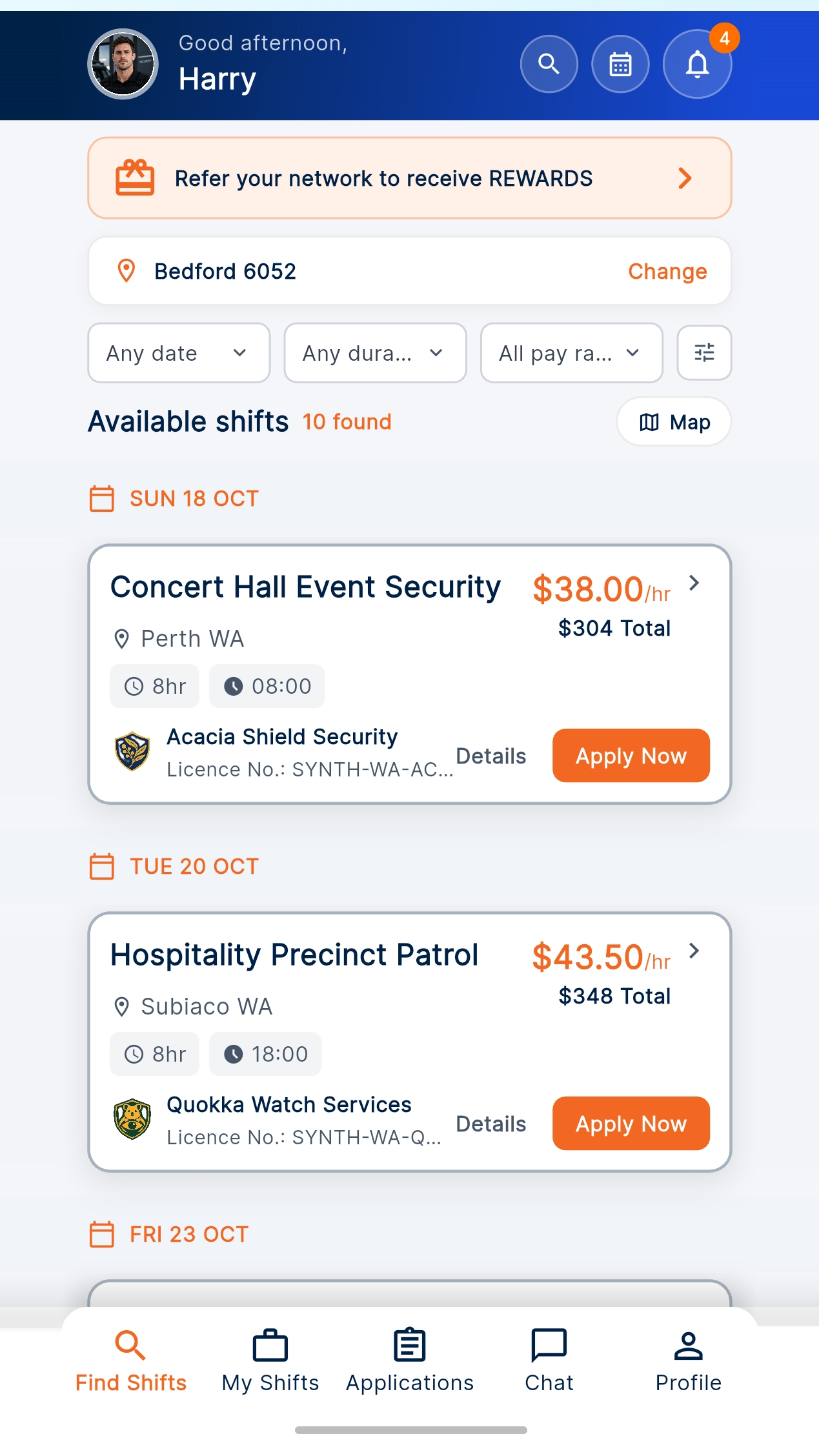
Find available shifts
See the opportunities available to you in Find Shifts.
HOW IT WORKS
Start with the outcome you need.
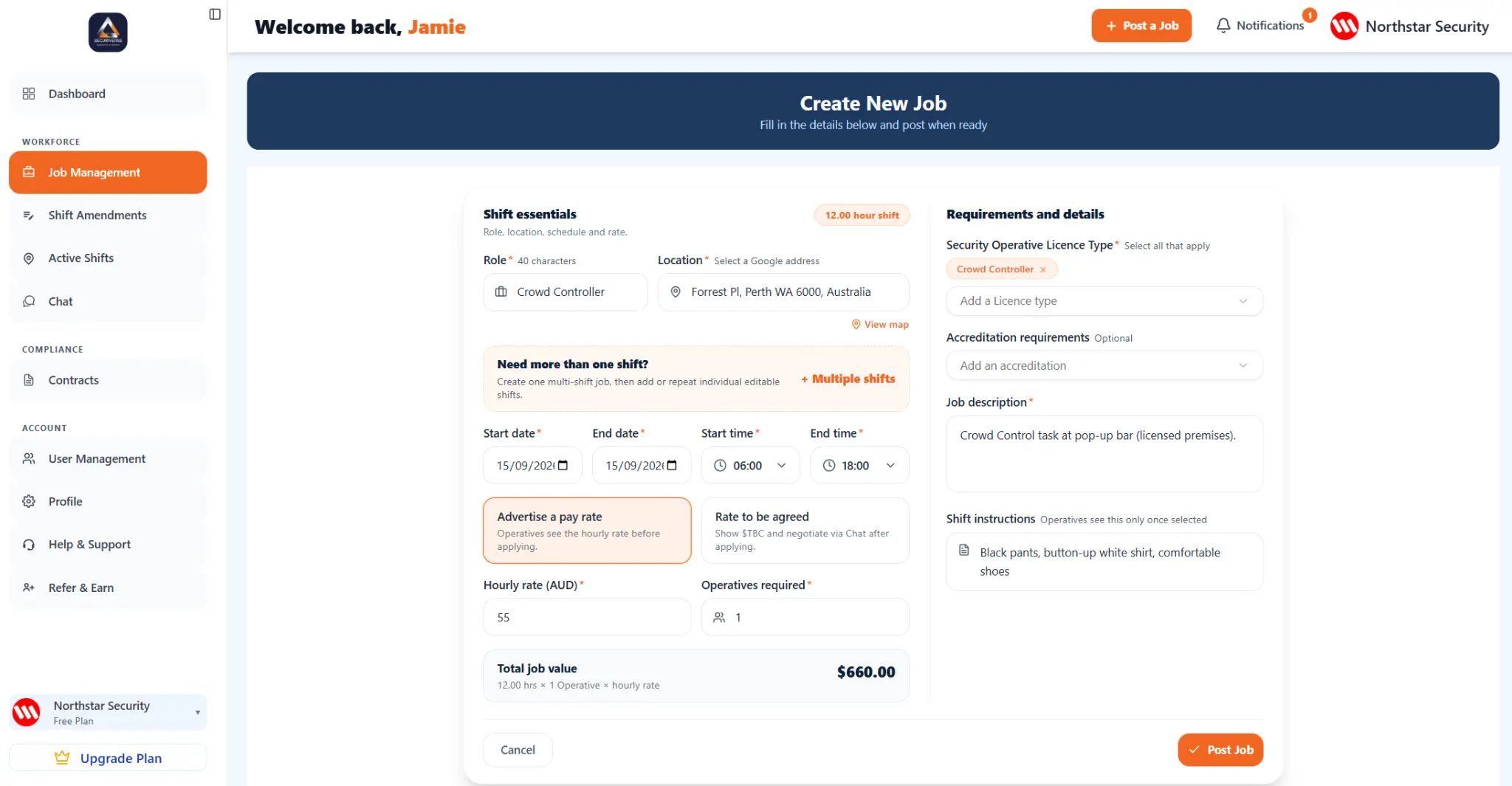
Create a Job
Add the role, shift details and what you need.
Select an Applicant
Review applicants and choose who you want for the shift.
Monitor the Shift
Follow the shift from its start through completion.
Create a Profile
Add your experience and relevant licence or accreditation information.
Find Shifts
See available shifts in the Securiverse app.
Check in. Check out.
When selected, check in when the shift starts and check out when it ends.
COMPANIES
A direct way to fill your next shift.
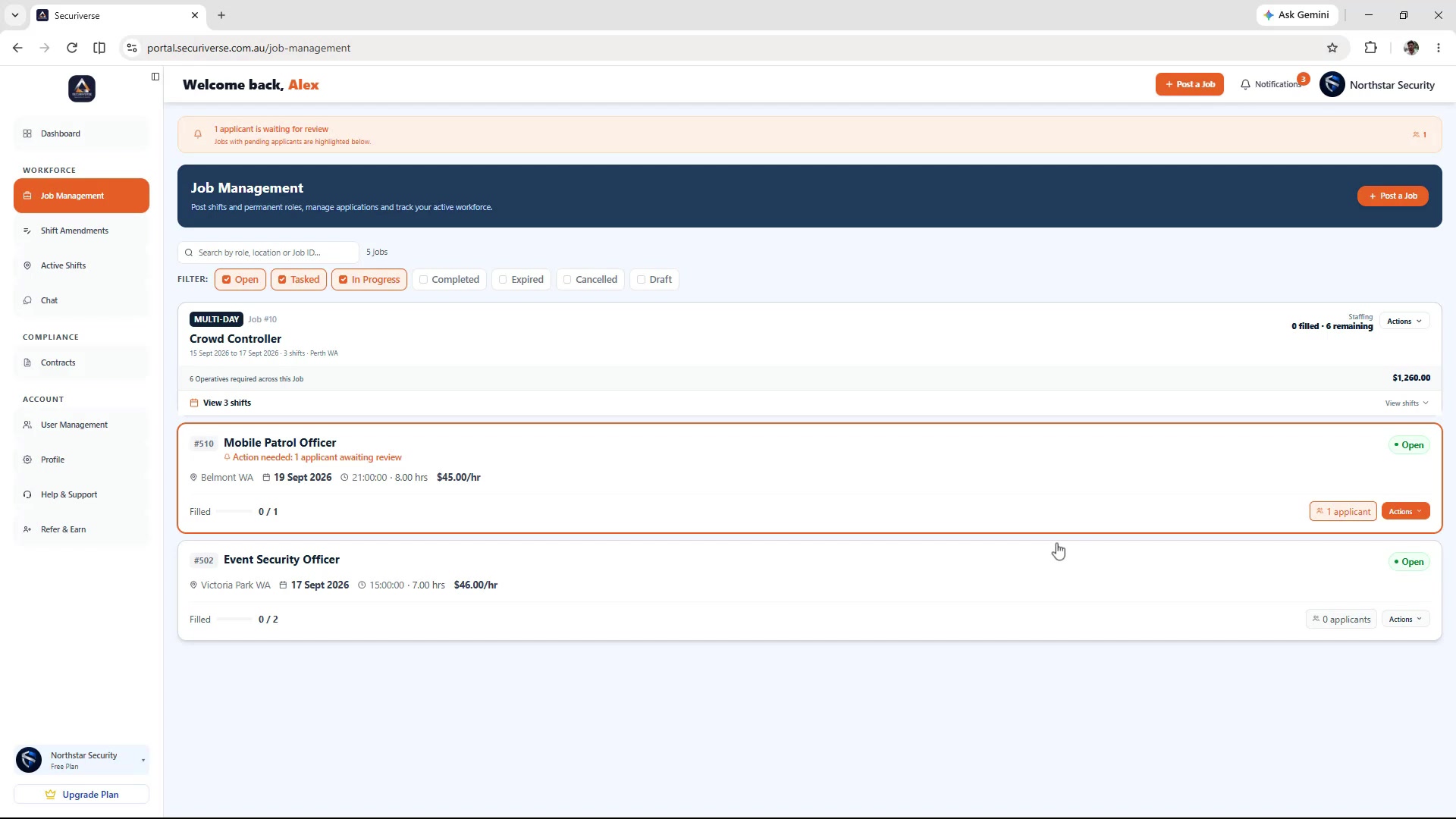
Use the Company portal to create a Job, see who applies, select an applicant and monitor the shift from start through completion.
- Create a Job with the shift details
- Review the applicants for your job
- Monitor the shift from start through completion
OPERATIVES
More than a profile. A way to find work.
Create your profile, add your experience and relevant information, then look for available shifts in the app.
- Create your Operative profile
- Find Shifts in your area
- Apply for the shifts you want
YOUR SHIFT, STEP BY STEP
From an offer to an upcoming shift.
Keep the next step clear, all in the Operative app.
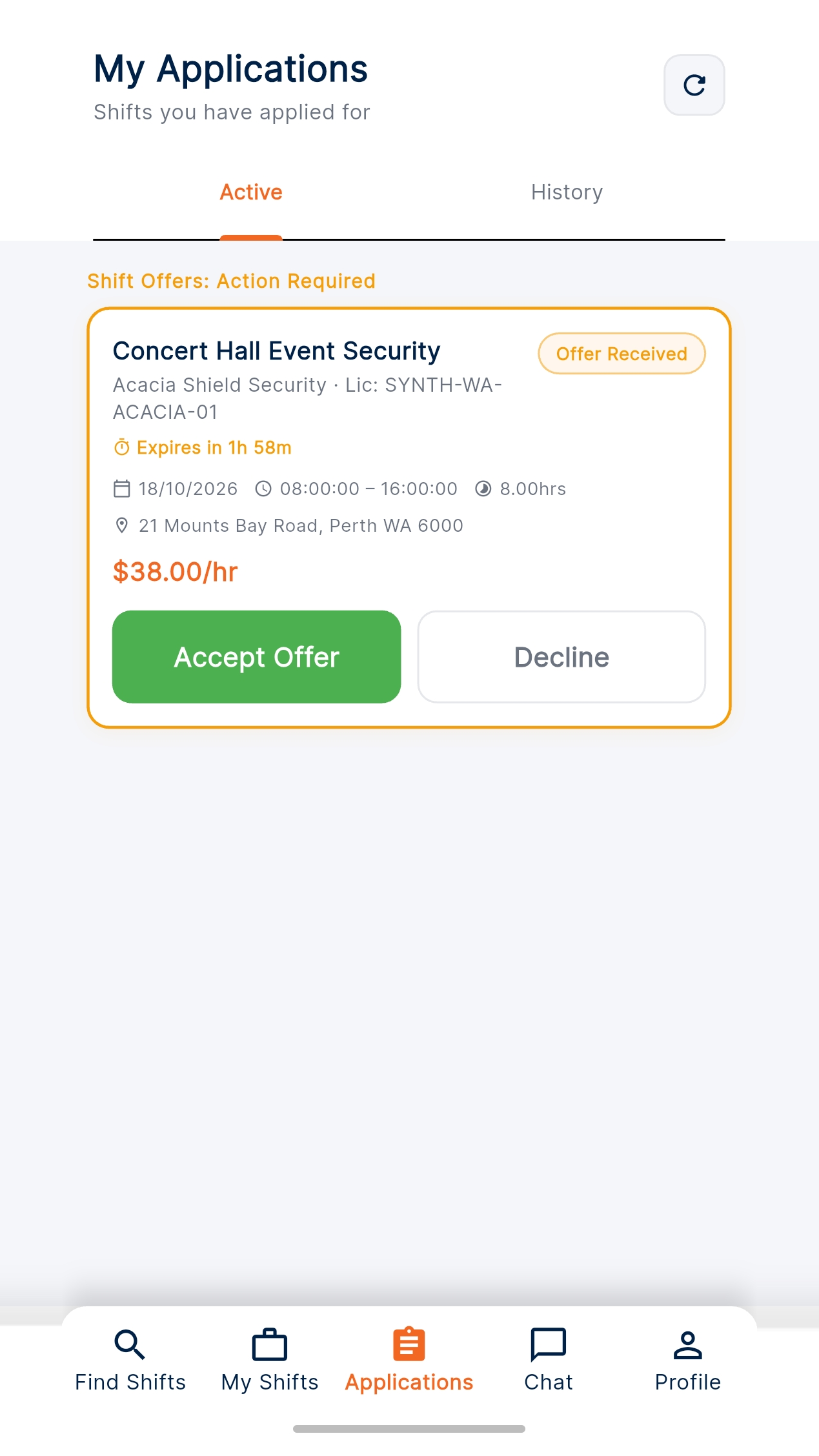
Review your offers
See the role, rate and offer expiry, then choose whether to accept or decline.
Know what is coming up
Review confirmed shift details, times and locations in My Shifts.
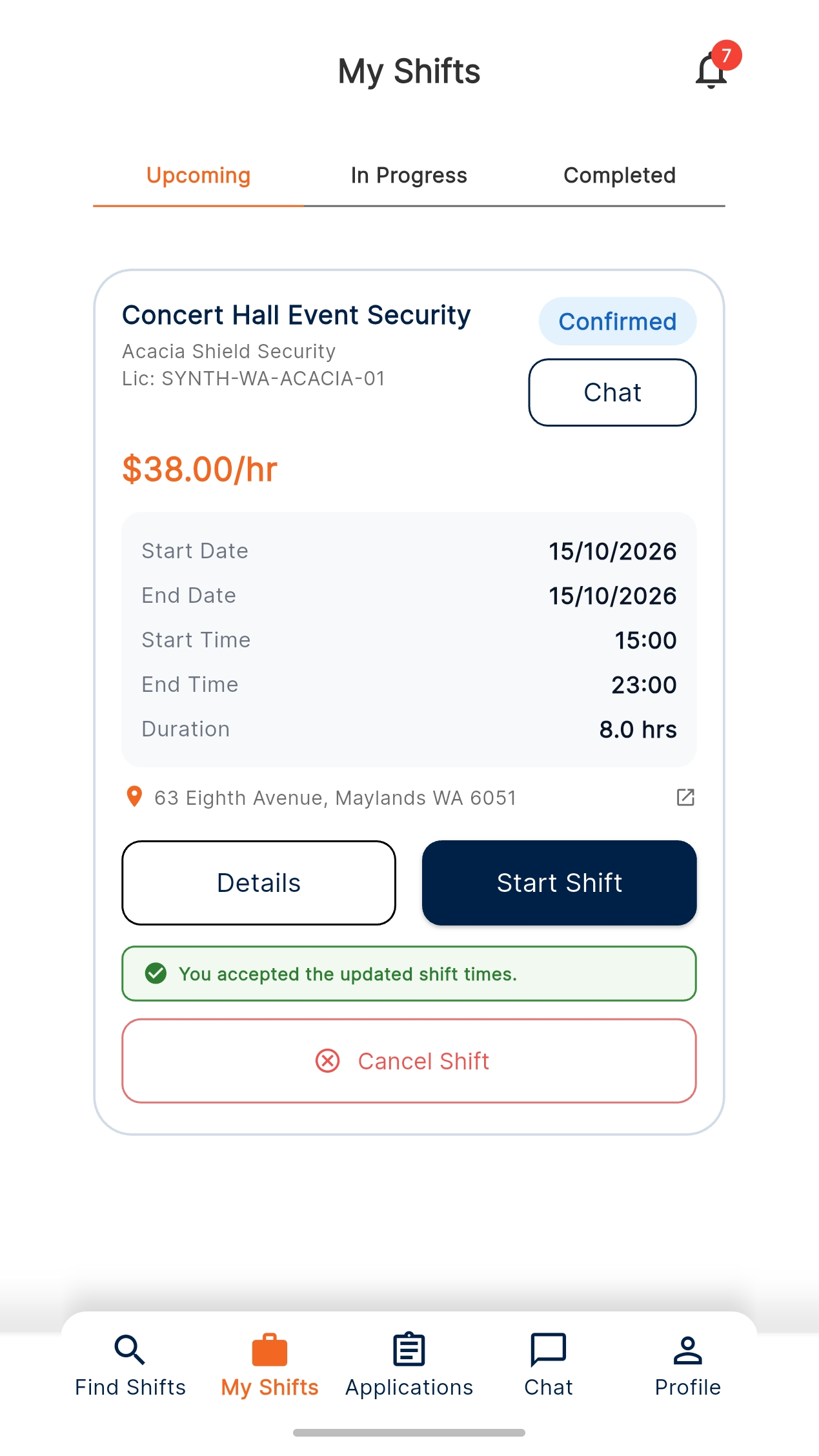
Actual Securiverse app screens shown with demonstration data.
OPERATIVE APP
Ready to Find Shifts?
Download Securiverse from the Apple App Store or Google Play.
Securiverse
Security Operative App
Look for this icon in the app store.
Download on your phone
Scan the QR code to open the right download option for your device.
Open the download page Download QR codeLAUNCH ACCESS
Use Securiverse at no cost until 1 January 2027.
Securiverse is completely free for Companies and Operatives throughout launch access.
There is no platform fee and no card, bank or payment details are required before 1 January 2027.
This applies to Securiverse platform access. Companies and Operatives continue to agree Job rates and payments directly with each other.
Questions about launch access? Contact usFREQUENTLY ASKED QUESTIONS
The essentials, answered.
Whether you are looking for work or need to fill a shift, here is how Securiverse works.
Still have a question? Contact usWhat is Securiverse?
Securiverse is a digital marketplace for the Australian security industry. It connects Companies and Operatives with each other and assists with job-related activity, including profiles, job listings, applications, chat, offers, engagement records and relevant licence information.
Is Securiverse an employer or a security company?
No. Securiverse provides the platform that connects companies and operatives. Securiverse does not employ Operatives, provide security services, pay Job wages or make the final decision to engage an Operative. Companies and Operatives decide directly whether to enter into an agreement with each other.
Who pays Securiverse?
Securiverse is free to use for Companies and Operatives until 1 January 2027. There is no platform charge and no card, bank or payment details are required during this launch access period. After launch access, the planned monthly subscription prices are $60 for Companies and $6 for Operatives, in Australian dollars including GST. Billing details will be provided before any payment details are requested.
Who pays the Operative?
The Company pays the Operative directly in accordance with their agreed engagement. Securiverse does not receive, hold, divide, transfer or guarantee payment for work performed.
How does an Operative add a licence?
An Operative can add and upload relevant licence information to their profile, including: a scan or photo of the licence; licence number; Expiry date; State or territory; and licence type. Relevant accreditations can also be added.
What does ✓ Verified mean?
✓ Verified means Securiverse has recorded an approved automated verification result or an authorised administrator review for the licence information displayed. Verification relates only to the information checked. It is not an endorsement or guarantee of the operative’s suitability for a particular job and does not guarantee availability, insurance, site clearance, conduct or future licence status. Companies are responsible for making their own final engagement and compliance assessment.
What do the other licence statuses mean?
Pending and results where source is temporarily unavailable are shown as not verified and verification in progress. A mismatch is shown as details needing attention. An expired licence is shown as not verified and expired. A licence with no completed check is shown as not verified.
Can a Company see whether a licence matches the Job?
Securiverse can display licence-status information in the context of a particular job, including Verified, not verified, Not verified for this role or No current Licence. This information assists with the company’s assessment but does not replace the companies own engagement, licensing or compliance checks.
Do I need a subscription during launch access?
There is no subscription to purchase during the launch access period. Until 1 January 2027, Companies and Operatives can use Securiverse without a platform charge or providing payment, bank or card details.
How do applications and shortlists work?
Operatives decide which jobs they want to apply for. Companies decide whether to shortlist, contact, select or offer a Job to an Operative. Securiverse can display relevant information on the Job requirements and an operative’s profile, but the Company makes the final engagement decision.
Does Securiverse recommend an Operative?
Securiverse may display profile, licence and other relevant information to help companies assess applicants. This information is provided as decision-support. It is not guarantee or endorsement of suitability, availability or future performance. Companies remain responsible for their final selection.
How are rates agreed?
A Company can advertise a rate or mark the rate as TBC while discussing it with an operative through Chat. An Engagement Contract offer cannot be sent while the rate remains TBC. The Company must enter a positive agreed hourly rate before sending the offer.
What happens when a Company sends an offer?
The offer is sent through the platform with the relevant Job details and offer expiry. The Operative can review the engagement record and accept or decline the offer. Securiverse records the offer and Operative’s response. The Company can keep a Job open while it considers or makes offers to other Operatives.
Do I need to draw or upload a signature?
No. The current platform records the engagement through the authenticated Company offer and Operative response. The applicable contract or engagement record must be available before acceptance.
How do multi-day Jobs work?
A multi-day Job is made up of individual shifts. An Operative can see the relevant date range and available-shift count, while companies can manage the individual future shifts. A change to one shift should apply only to that shift unless the parties agree otherwise.
What are check-in and check-out records?
Where enabled, Securiverse records time and location-linked check-in/out events for the Job. These are administrative platform records. They do not, by themselves, establish attendance, actual hours, payment entitlement, performance or fitness for duty.
Can Companies and Operatives rate each other?
The platform has engagement feedback tools. Ratings should be honest, relevant and based on the completed engagement. Ratings are feedback, not a guarantee of future performance. Concerns about false, abusive, discriminatory or retaliatory content can be reported for review.
How is my information used?
Securiverse uses account, profile, licence, Job, engagement, Chat, subscription and other platform information to run and secure the service. Relevant information is shared with the relevant Company or Operative for Job discovery, assessment and engagement. For complete information about how personal information is handled, please read the Privacy Policy.
Will I be charged during launch access?
There is no subscription or billing arrangement during launch access. From 1 January 2027, the planned subscription prices are $60 per month for Companies and $6 per month for Operatives, in Australian dollars including GST. Billing details will be provided before any payment details are requested.
What should I do if something is wrong?
Contact Securiverse support and provide the relevant Job, licence or account details. Disputes concerning a Job, rate, payment, employment arrangement or work site are primarily matters between the Company and the Operative. Where available, Securiverse may retain relevant platform records associated with the engagement.
How do Companies fill a shift?
Companies use the Company portal to create a Job, review applicants and select the person they want for the work.
How do Operatives find work?
Operatives create a profile, add their experience and relevant licence information, then use Find Shifts to see work that is available to them.
Can Securiverse be used for permanent roles and short-term shifts?
Yes. Securiverse is designed to support both ongoing opportunities and short-term shift requirements.
How does location-based Job discovery work?
Operatives can look for available Jobs in the areas they choose, helping them focus on work that is relevant to where they want to work.
What are check-in and check-out records used for?
Where enabled, the app records shift activity at the start and end of a Job. These are administrative platform records and do not independently determine attendance, hours or payment entitlement.
How can I get help?
Email the Securiverse team at support@securiverse.com.au or use the contact form below.
CONTACT US
Questions? We are here.
Operatives, Companies, industry organisations, RTOs, venues and others are welcome to contact the Securiverse team.
support@securiverse.com.au Instagram
  Facebook
  LinkedIn